
Beast of Reincarnation on a Laptop: What the Spec Sheet Answers, and What Nobody Has Measured
The published requirements name desktop cards only. For a GTX 1650, an RTX 4050 Laptop or an Iris Xe, two things are still knowable from the sheet — and a framerate is not one of them, on any laptop, from anyone.
Nobody has published a framerate for this game on any laptop or integrated GPU, and this site has measured none. Every figure on this page is either the publisher’s spec sheet or a vendor’s published board specification. If you want an fps number for your machine, the honest state of the evidence is that it does not exist yet.
Why this question has no page and every answer is a forum thread
The name you searched does not contain the answer
That is not a figure of speech. It is the reason this cluster is held by YouTube, Reddit and the Steam forums rather than by any guide site.
A laptop model name does not determine its GPU — the Acer Nitro V15 is sold across several graphics configurations, so “will a Nitro V15 run it” has more than one true answer. A laptop GPU name does not determine its memory either: the RTX 3050 Laptop ships as a 4 GB part and as a 6 GB part under one label. And a laptop GPU is supplied with a power limit the chassis sets, so two machines carrying the same name are not obliged to behave the same.
Three layers of ambiguity sit between the query and the hardware. A thread resolves them by asking a follow-up question; a page that answers the query as typed has to guess at all three and will be wrong for some readers on every one. So the ledger below does not ask you to recognise your part in a list of chips before it will tell you anything — every row is open, and you scan for yours.
Nine parts, two published numbers each, and the same missing third
Find your row. Every one carries which side of the publisher’s own DLSS bracket the part sits on, and how its board memory compares to the 8 GB the minimum row names. The third column is blank on all nine, and that is the finding rather than a gap in this page.
Outside the publisher’s own RTX 20-50 Series bracket, so FSR is the entire upscaler menu.
Inside it. The game still starts you on FSR 1 Performance, so the upscaler you want is one you set and re-set.
- DLSS branch open
- FSR only
Both outputs are published figures: the upscaler branch is the publisher’s own minimum-tier footnote, and the memory line sets a vendor board specification beside the 8 GB that footnote’s hardware row names. The bars are drawn against a fixed 12 GB axis so the rows are comparable with each other.
Two minutes, and it replaces all three guesses
Find the part that is actually in the machine
Every row in the panel above needs this first. On a laptop with switchable graphics you have two GPUs and the game uses the dedicated one.
- Press Ctrl+Shift+Esc to open Task Manager, then Performance. The GPU entries are listed down the left with their full names, and a laptop that has two will list both.
- Or press Windows+R, type dxdiag, and read the Display tabs. A laptop with switchable graphics gets one tab per GPU, and the one the game uses is the dedicated card rather than the integrated one.
- Dedicated VRAM is on the same screen in both places. That is the number the minimum row is asking about, and on an integrated part it is borrowed from system RAM rather than published as a board figure.
| Searched as | What the name actually pins down |
|---|---|
| Acer Nitro V15 | A chassis sold across several GPU configurations rather than one part. The model name does not decide the answer; the GPU inside it does. |
| Alienware Aurora R12 | A desktop, not a laptop, and also sold across several GPU configurations. If yours has a desktop RTX card, the measured ladder on the PC settings page covers it directly. |
The setting that matters most on the weakest hardware
The game starts every machine on a decade-old upscaler
On a part outside the publisher’s DLSS bracket this is not just the starting point — FSR is the entire menu, so where the game puts you and where you can get to are closer together than on a desktop RTX card.
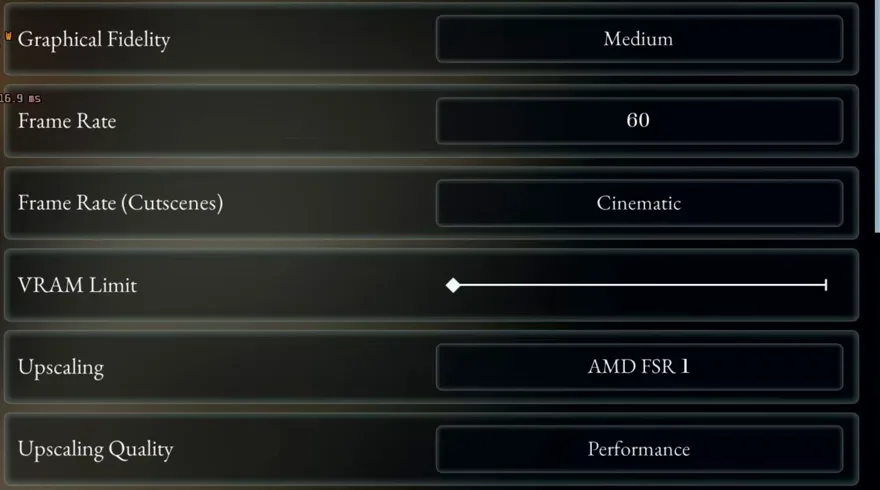
Performance mode renders at half the output width and half its height, so a 1080p window is 960×540 in the engine before reconstruction. That is the mode the publisher’s own footnote quotes at both tiers, and it is the mode the game selects unasked. On low-memory parts it is also the setting doing the most work, which is why the fixes page leads with it rather than with a preset.
What a measurement looks like when there is one
Every published figure for this game names a desktop
Printed here so the absence is visible. The bar for a number on this site is a named tester and a captioned configuration — and no laptop has cleared it.

Where each claim came from
Sheet, vendor specification, arithmetic, or nothing at all
- OfficialThe minimum tier names 8 GB boards and quotes "Low 1080p @ 40fps w/ DLSS (RTX 20-50 Series) or FSR1 (Performance)".
Valve's appdetails payload for App ID 2001760, fetched 2026-08-12, transcribed word for word rather than paraphrased. The bracket naming the DLSS hardware is the publisher's, not ours.
- OfficialWhich board memory each part carries, and which parts ship in more than one configuration.
Vendor product specifications. These are published board figures, not measurements of ours, and the rows that split (RTX 3050 Laptop, 4 GB and 6 GB) are shown split rather than resolved to one number.
- InferredThat a part is "under the memory the minimum row names".
Ours, and it is subtraction on two published figures. It is a memory comparison only — it deliberately stops short of saying what performance follows, because a memory figure on its own does not predict frame rate.
- UnverifiedAny framerate on any laptop or integrated GPU.
No such measurement has been published by anyone, and nobody on this site owns the hardware. The panel returns no number rather than borrowing the desktop ones, which is the failure mode this page was built to avoid.
Questions this page is asked in the words they are asked in
Read next
Sources for this page
- Beast of Reincarnation system requirements (Steam) — Official — the two published tiers and the Additional Notes footnote both readings on this page come from.
- Daniel Owen — PC Performance Tested — The four measured desktop configurations, and the source of both figures on this page. No laptop appears in it.