
Beast of Reincarnation OptiScaler: Frame Generation the Menu Still Will Not Give You
v1.0.8 put DLSS 4/4.5 and FSR 4 in the game’s own menu on 15 August, so half the reason to install this is gone. Frame generation is not in the menu and is still named for a later patch — that is what OptiScaler is for now. The exact build, filename, Engine.ini and the three known issues, transcribed from the project’s own per-game entry.
Read this first, updated 18 August 2026. The v1.0.8 patch on 15 August implemented DLSS 4/4.5 (L/M) and FSR 4 in the game itself, on PC. Everything below was written when the menu topped out at FSR 3, so the upscaler half of the case for installing OptiScaler is largely gone — check the in-game menu on 1.0.8.0 before you touch a DLL. What the patch did notadd is frame generation: the same notes list it as planned for a later patch, which leaves OptiScaler’s FSR 3.1-FG route as the only frame generation in this game today. Nothing on this page has been re-tested against 1.0.8.0, and a patch that changes the upscaler stack is exactly the kind that breaks an injected DLL. Nobody on this site has installed OptiScaler into this game. Every number, filename and config line below is transcribed from the OptiScaler project’s own per-game wiki entry, which names its three testers and the single card they tested on. That is a good source for what it is — a report from people who did the thing — and it is not a benchmark, not a developer statement, and not evidence about your hardware. The panel below says which of those you are reading.
Why this page exists
Written when the menu topped out at FSR 3 — v1.0.8 changed that
Two things this site measured before 15 August set up the problem, and the patch has since answered one of them. The game boots into AMD FSR 1 on Performance— a 2021 spatial upscaler, on every card tested — and the highest the menu offers instead is FSR 3. For Radeon owners the obvious escape, AMD’s driver-level FSR 4 override, reports inactive against this game. So the two supported routes end at FSR 3, and the third route is this one.
What OptiScaler changes is the upscaler and the frame-generation path, not the defaults. It does not stop the game forgetting your choice on the next launch — see the known issues below, which is the single most common complaint attached to this game’s upscaling and the one thing on this page nothing fixes.
Pick your card
What to install, what to select, and what it costs you
Four families, one report. Selecting a card that is not the one the wiki tested says so before it says anything else.
GeForce RTX 5090–5060 and RTX 4090–4060
Nobody has reported this working on your card. The only test on record is Radeon RX 9070 XT on Windows 11; everything below is that report read across to your vendor.
- Install OptiScaler as
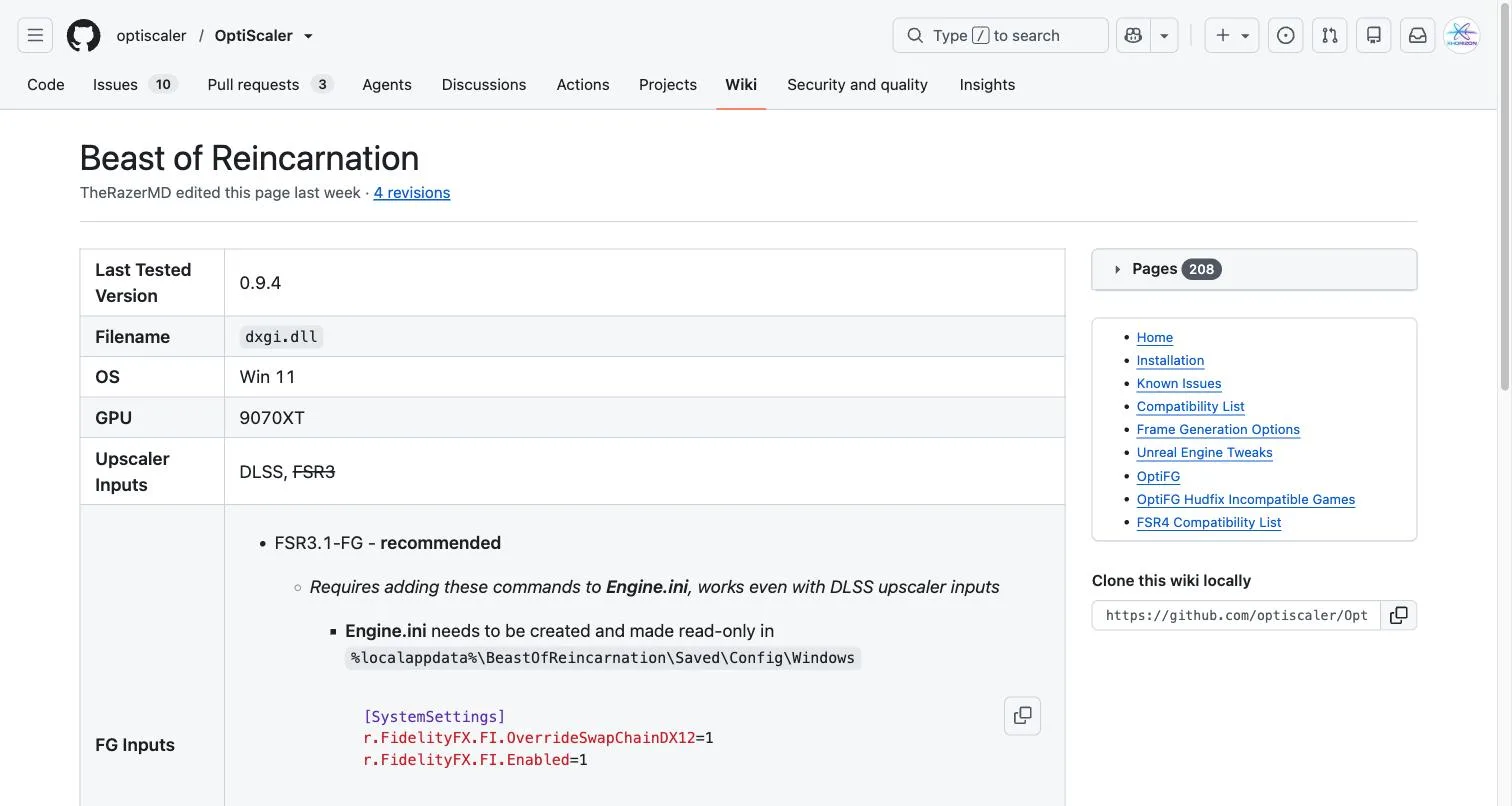
dxgi.dllThe wiki’s entry was last verified against OptiScaler 0.9.4. The filename is the part that is game-specific: this title wants the DLL renamed to
dxgi.dll, beside the game executable. - Set the in-game upscaler to DLSS
DLSS is one of the two inputs the wiki lists, and the only one it does not strike through. Select it in the game menu, then let OptiScaler take it from there.
- Frame generation: FSR 3.1-FG
The wiki marks this recommended and states it works even with DLSS upscaler inputs, which is the combination that matters on these cards.
- Write Engine.ini, then make it read-only
Create it at
%localappdata%\BeastOfReincarnation\Saved\Config\Windows. The read-only flag is the step people skip and it is the step that makes the file survive — the game rewrites its config on launch otherwise.[SystemSettings] r.FidelityFX.FI.OverrideSwapChainDX12=1 r.FidelityFX.FI.Enabled=1
Worth knowing on this card: These cards already have hardware DLSS frame generation, and a separate Nexus mod exposes it directly. OptiScaler is the route worth taking here only if that mod does not work for you.
Transcribed, not summarised
The source, as it reads
Three, and one of them has no fix
Known issues the wiki publishes against this game
No fix. The wiki lists it and offers nothing against it. Lyall’s ultrawide mod separately claims to fix the reverting — that claim is untested by this site and is compared against the other three on the mods page.
Set EnableFsr3Inputs=false in OptiScaler.ini. OptiScaler applies this for you from 0.9.5 onward, so this step only exists if you are on 0.9.4.
Set AlwaysCaptureFSRFGSwapchain=true in OptiScaler.ini. OptiScaler applies this for you from 0.9.5 onward, so this step only exists if you are on 0.9.4.
How well attested each part is
Evidence
- CorroboratedThe game reverts to FSR 1 on every boot and does not save the selected upscaler. OptiScaler does not fix this.
Three independent places: listed first under Known Issues on the OptiScaler wiki entry, the subject of its own Steam forum thread, and the stated purpose of a dedicated Nexus mod. None contradicts the others.
- UnverifiedOptiScaler 0.9.4 runs in this game as dxgi.dll, with DLSS as a working upscaler input and FSR 3.1-FG as the recommended frame-generation path.
One document — the OptiScaler project's per-game wiki entry, read 11 August 2026. onehoon, Bayu, TheRazerMD are named on it as the reporters, on Radeon RX 9070 XT / Windows 11. Nobody independent has confirmed any of these values, and the developer has said nothing about them.
- InferredWhich upscaler the in-game menu can hand OptiScaler follows from your GPU vendor, not from the wiki.
The wiki lists which inputs OptiScaler accepts. Which of those a given card is offered in the game’s own menu is ordinary vendor availability, applied here rather than sourced.
- UnverifiedThat any of this works on a card other than a Radeon RX 9070 XT.
One configuration has been reported. Three of the four GPU families on this page are extrapolation, and the panel says so when you select them.
Beast of Reincarnation OptiScaler FAQ
Sources for this page
- OptiScaler wiki — Beast of Reincarnation configuration — Community — the per-game entry maintained by the OptiScaler project. Every value on this page comes from it. Read 11 August 2026, at 4 revisions, reported by onehoon, Bayu, TheRazerMD.
- OptiScaler — project repository and releases — Community — where the build named above comes from, and the only place to check whether a newer one has changed any of this.
- Beast of Reincarnation official Steam store page — Official — PC release information, developer, publisher and product details.
The wiki entry is a living document — it was at 4 revisions when this page was written, and a newer OptiScaler build may have retired any of the three known issues. Follow the first link for the current version, and use the correction form if a row here has gone stale.
Related