
Beast of Reincarnation on Steam Deck: 30fps, Two and a Half Hours, and Nothing to Change
Valve rates it Unsupported. The one outlet that measured it got about 30fps and called it playable. Both are true — here is what each of the five handheld situations actually gets, with the settings panel transcribed row by row.

Nobody on this site owns a Steam Deck. Every framerate, wattage and battery figure below belongs to one review by one person on one unit, and it is the only such review that exists — so it is printed with their name on it rather than absorbed into our own voice. What we contribute is Valve’s four separate verdicts, read off Valve’s own endpoint on a script rather than off a badge screenshot, and the arrangement that lets you see which of the two you are reading at any point on the page.
The whole answer, in five numbers
What one reviewer measured on Deck hardware
Steam Deck HQ, 3 August 2026. Their score before rounding was 2.5 / 5; they rounded up and said so, which is the kind of detail that usually gets lost in a summary.
Pick your device
Five situations, and only one of them has ever been measured
Valve rates four devices and gives three different answers. The fifth row is the Windows handhelds Valve does not rate at all, which is the most-asked version of this question and the one with no number behind it.
Steam Deck LCD and OLED
UnsupportedValve’s verdict for Steam Deck, from the same call that rates the other three differently.
Someone has actually run it on this hardware. Steam Deck HQ measured ~30fps at 18W – 23W for ~2.5 hours, on one unit, on 3 August 2026. One outlet is not a benchmark, and it is the only one there is.
Valve rates it Unsupported and the only person who measured it got about 30fps and called it playable. Both are true. Valve is grading the out-of-the-box experience against a fixed bar; the reviewer is reporting what the hardware does once the game has turned itself down.
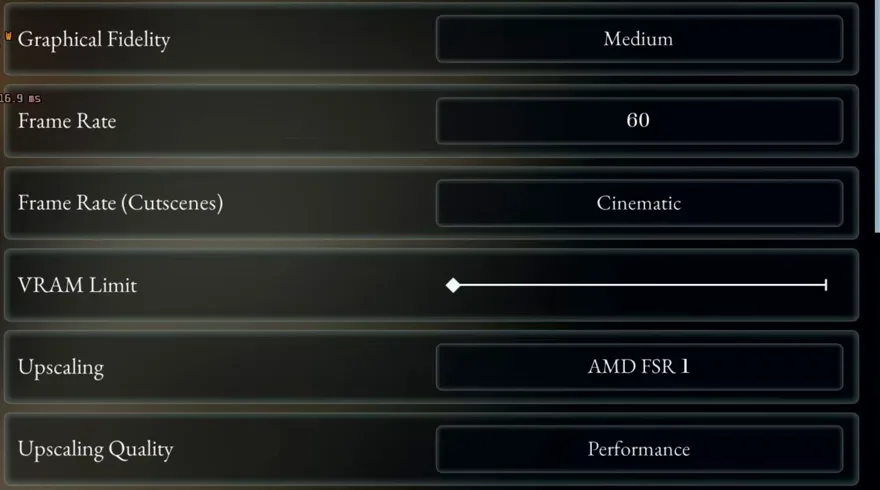
Install and launch it. Do not pre-emptively change anything — the game detects the Deck and selects Low with FSR 1 on Performance for itself.
Leave the compatibility dropdown on Valve’s default. There is no native Linux build, so this runs through Proton either way and SDHQ forced nothing.
Expect around 30fps in fights, 18–23W of draw and roughly two and a half hours off a charge.
Read the black-screen report on our issues tracker before you buy. It is unresolved, it has no developer reply, and it is the one failure mode that is not a framerate compromise.
The part that bites: The failing test result Valve names is graphics performance — one line, not a list. The reviewer’s explanation is that the game is CPU-heavy, which is why turning the resolution down further does not buy back what you would expect.
Transcribed, not summarised
The settings panel, row by row — and the shortest row is the answer
Most Deck guides for most games are a list of things to turn down. This one is not, because the game has already turned them down for you.
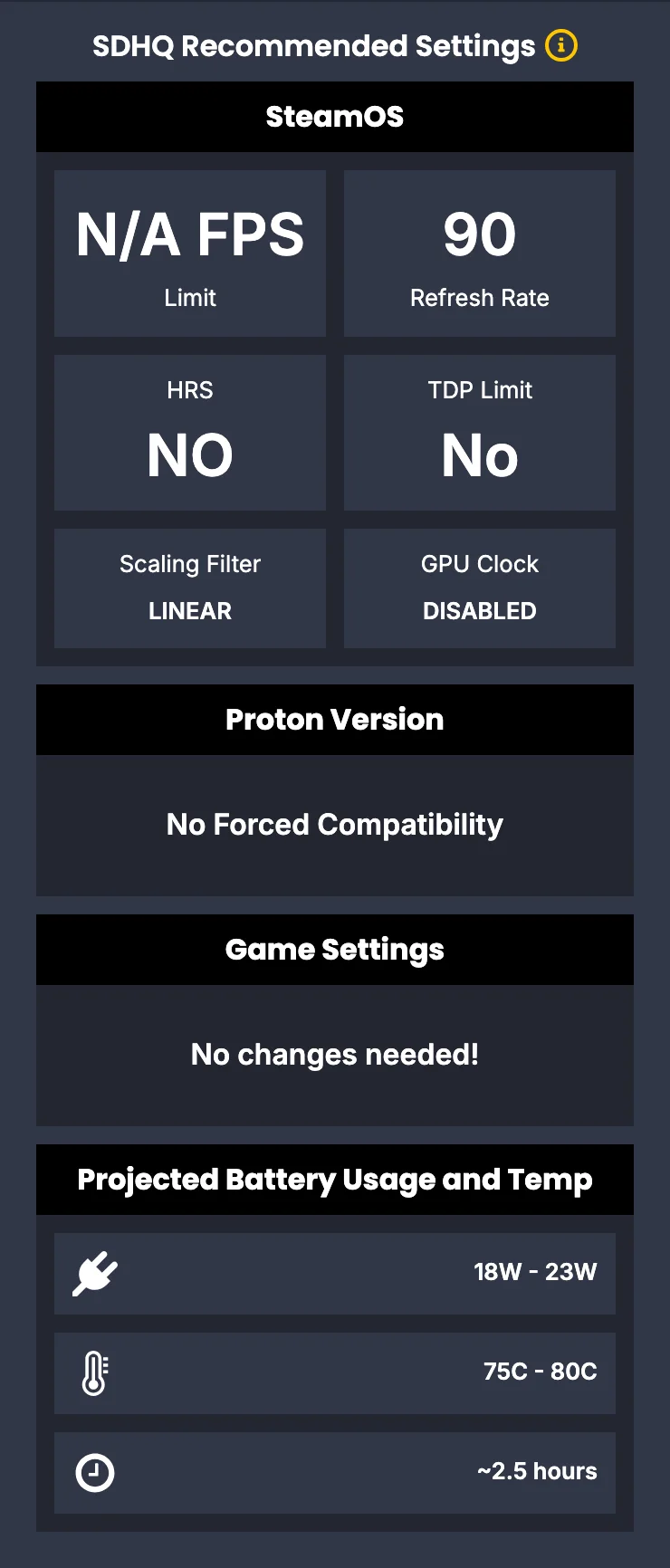
| Setting | Steam Deck HQ’s value |
|---|---|
| In-game settings | No changes neededThe game picks Low with FSR 1 on Performance by itself on Deck. There is nothing to turn down that it has not already turned down. |
| Proton version | No forced compatibilityLeave the compatibility dropdown alone. The Steam build is Windows-only, so this runs through whichever Proton Valve currently defaults to. |
| TDP limit | NoUncapped. The measured draw sat at 18–23W without one. |
| GPU clock | DisabledNo manual clock floor. |
| Half-rate shading | No |
| Scaling filter | Linear |
| Frame limit | None |
| Refresh rate | 90As printed in their panel. The review does not name which Deck model it was measured on, so read this as their configuration rather than as a requirement. |
Labels and values are theirs. The notes beside them are ours. Their review of the game itself was played on a desktop — they say so — and only the Deck section was measured on Deck hardware.
Why there is nothing to set
The game picks its own preset, on Deck and on desktop
This is not Deck-specific generosity. The same defaulting is the first thing our PC fixes page measures on desktop — the game arrives on FSR 1 set to Performance, a 2021 spatial upscaler, without being asked. On desktop that is a problem worth undoing. On a Deck it is the configuration a reviewer would have chosen anyway, which is why their in-game recommendation is an empty list.
What it does not fix is the reason Valve failed it. The failing test result is graphics performance, and the reviewer’s explanation for the stutter is that the game is CPU-heavy — so the usual handheld lever, dropping resolution until the GPU keeps up, has less to give here than the framerate suggests. If frame generation is the lever you wanted, the game does not ship it and the third-party route is on its own page, tested on exactly one desktop card.
Four devices, three answers
What Valve actually says, per device
Read from Valve's own hardware-compatibility endpoint on 2026-08-06. The test-result tokens are printed because they are the only strings you can paste into a search box to check us against Valve's own interface.
| Device | Valve’s rating | Test results behind it |
|---|---|---|
| Steam Deck | Unsupported |
|
| SteamOS | Playable |
|
| Steam Machine | Verified |
|
| Steam Frame | Not rated | Valve has not rated this device. Not the same as rating it badly. |
Read 2026-08-06. Category numbers are undocumented and re-derived on every sync against Portal 2, The Witcher 3, Red Dead Redemption 2, Destiny 2 and PUBG. The wording beside each token is ours, expanded from Valve’s own localisation key — the key is printed so you can match it against Valve’s UI.
Two rows repay a second read. SteamOS passes on startup and fails on one thing — external controllers are not supported for the primary player — which matters most on exactly the machine where a controller is the only input. And Steam Frame is unrated rather than badly rated; the row is printed rather than dropped so that the difference is visible. Whether the badge itself is likely to move is a separate question, and it has its own page with the developer’s reply on it.
Before you buy it for the train
One unresolved report that is not a framerate compromise
Separately from the rating, our issues tracker carries an unresolved report of a black screen instead of the game, on Steam Deck and on desktop Linux, with no developer reply and no working fix posted. Nobody has established whether the two cases are the same fault. It does not contradict the 30fps measurement — those could easily be different machines in different states — but a page quoting a playable framerate without mentioning that some people get no picture at all would be selling you something.
How well attested each part is
Evidence
- OfficialValve rates the game Unsupported on Steam Deck, Playable on SteamOS, Verified on Steam Machine and has not rated Steam Frame.
Valve's own hardware-compatibility endpoint, captured by our sync script on 2026-08-06. The category numbers behind those words are re-derived on every run against five titles whose badges are settled, and the run aborts rather than writing a snapshot if they disagree.
- UnverifiedAbout 30fps in most fights, 18W – 23W, 75°C – 80°C and roughly two and a half hours of battery.
Steam Deck HQ, 3 August 2026, by Noah Kupetsky. One outlet, one unit, one sitting, and the only published measurement that exists on this hardware. Nobody on this site owns a Deck and nothing here was reproduced.
- UnverifiedThe game selects Low with FSR 1 on Performance by itself on Deck, so the recommended in-game change is none.
Two halves of the same review agreeing with each other — the reviewer's prose ("We default to the Low graphical quality with FSR 1 upscaling on Performance") and the "No changes needed!" row in their settings panel. Still one source.
- InferredBeing CPU-bound is why turning the resolution down further does not buy back what you would expect.
Ours. The reviewer states the game is CPU-heavy and separately reports the stutter; joining those two into a recommendation about what not to bother adjusting is this page's reading, not theirs.
- UnverifiedAnything at all about ROG Ally, Legion Go or MSI Claw performance.
No rating and no measurement exists. The row on the picker says so instead of quietly borrowing the Deck numbers, which is the failure mode this page was built to avoid.
Beast of Reincarnation Steam Deck FAQ
Sources for this page
- Steam hardware compatibility report — App ID 2001760 — Official — Valve's own rating for all four devices with the test-result tokens behind each. Keyless, and the identical payload is embedded in the store page as `data-hardwarecompatibility`. Captured by our sync script on 2026-08-06.
- Steam Deck HQ — Beast of Reincarnation review and Deck performance — Press — the only published measurements on Deck hardware: ~30fps on Low with FSR 1 on Performance, 18W – 23W, 75°C – 80°C, ~2.5 hours, 3 / 5. By Noah Kupetsky, 3 August 2026. Read 12 August 2026.
- Steam Community — "Steam deck verified?" — Community — where a developer answered "Short answer: not yet" on 30 July 2026, naming text size and contrast, default performance and Deck UI/input as what the review flagged, and stating the game is Compatible with SteamOS and Verified for Steam Machine.
- Beast of Reincarnation official Steam store page — Official — PC release information, developer, publisher and product details.
Valve's rating is re-read on a script and can move without anyone announcing it — the developer named default performance as one of three things the Deck review flagged, and a Performance default shipped in the first patch. The measured figures cannot move the same way: they are one review from 3 August 2026 and will stay that until somebody publishes a second. Use the correction form if you have measured this yourself.
Related